
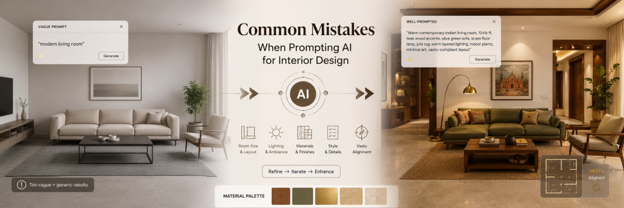
Common Mistakes People Make When Prompting AI for Interior Design
Type "modern living room" into an ai interior design tool and see what comes back. Beige sofa. Grey rug. Some warm white lighting that could be in literally anyone's house. Nothing about it is wrong, technically. It's also not yours in any way.
Almost everyone hits this wall the first time they use ai room design tools, and honestly, the tool usually isn't the problem. Below are the mistakes that keep showing up, in no particular order of severity, since some of these compound each other more than others.
Being Too Vague About Style
"Modern living room" is three words. An AI system has to fill in everything else, so it reaches for whatever's most average. That's the beige sofa, right there.
Weak: Modern living room Better: Warm contemporary living room with teak wood accents, low-profile olive fabric sofa, brass floor lamp, soft layered lighting for evening reading
The gap between those two isn't about writing more words for the sake of it. It's about specificity. Material. Colour. Furniture type. Mood. Each one gives the AI something concrete to aim at instead of falling back on an average.
Cramming Too Many Styles Into One Prompt
Brutalist, Scandinavian, Art Deco, and minimalist Japanese all in one sentence sounds ambitious. What actually comes back is closer to visual static. These design languages don't sit together comfortably to begin with, so the AI tries blending them anyway and ends up with something that commits to nothing at all.
Genuinely torn between two directions for a room? Fair enough. Just run them as separate prompts instead. Compare the two outputs side by side rather than asking one prompt to do both jobs at once.
The "No Clutter, Not Too Modern" Trap
There's a habit a lot of people fall into where they describe a room almost entirely by what they don't want. No clutter. Not industrial. Avoid heavy furniture. It reads like guidance, but AI models actually struggle more with negative instructions than positive ones, since the system spends effort ruling things out rather than building toward anything.
Try flipping it. "Clean surfaces, minimal decor, a few curated accent pieces" gets you further than three sentences of what to avoid ever will.
Skipping Room Dimensions Entirely
This one trips up Indian homeowners specifically, and often. Compact 2BHK and 3BHK layouts don't leave much room for guesswork. People upload a photo and expect the AI to somehow know the space is tight. It can't. Not reliably, anyway. An AI tool infers scale loosely from an image. It has no idea your living room is 11 by 13 feet unless you actually tell it, and it definitely doesn't know there's a support column two feet from the balcony door.
Say the size in feet. Mention the column, the door swing, whatever's structural and non-negotiable. A wardrobe that works for a 6 foot alcove looks completely different from one squeezed into 4 feet, and the AI is guessing blind without that number.
Not Mentioning Lighting at All
Lighting probably changes a room more than any other single variable, and it's the detail people forget most. "Natural light" barely counts as a lighting instruction. Is that harsh 2pm sun or the softer light that shows up around 7am? The AI still has to guess either way.
Golden hour through east facing windows. Overcast, diffuse daylight. Warm lamp light with soft shadows for evening. Each phrase produces a genuinely different image, even from the exact same room photo.
Forgetting Vastu Entirely, Then Being Surprised
Here's something most guides on this topic don't mention, mainly because most of them aren't written with Indian homes in mind. AI interior design tools are trained on global data. Vastu shastra doesn't exist in that training set in any meaningful way, so if it matters to you, it needs to go in the prompt itself.
Kitchen facing southeast. Mandir unit in the northeast corner. Main door not aligned directly with a staircase. Say it upfront. Skip it, and you'll likely be re-prompting from scratch later rather than making a small fix, because the whole layout logic was built without that constraint in mind.
Stopping After One Render
The first output is a draft, not a verdict. A lot of people generate exactly one image, don't love it, and quietly decide AI room design "doesn't really work." That's usually a workflow problem more than a tool problem.
Generate a handful. Look at what's actually landing, maybe the materials feel right but the light is flat, and adjust just that one thing before you regenerate. Three to six attempts is typical before something clicks. One attempt almost never is.
Handing the Render Straight to a Carpenter
This is the mistake with the most expensive consequences, and it happens because the render looks so convincing. It's tempting to print it out and say "build exactly this." Don't. AI renders don't know what your local carpenter can actually source, they don't know how a colour will look once your afternoon sun hits it differently than the render's lighting assumed, and they've never had to deal with a vendor substituting one material for another.
Treat the render as a shared reference, the mood, the material direction, the general feel, and let an actual designer turn that into something with real specifications and vendor quotes attached. That gap between a nice image and a livable room is exactly the space a human designer fills.
Quick Reference
|
Mistake |
What Shows Up |
Fix |
|
Vague style |
Forgettable, generic room |
Add material, colour, mood |
|
Conflicting styles |
Visual noise, commits to nothing |
One direction per prompt |
|
Negative-only instructions |
AI struggles to build toward anything |
State what you want instead |
|
No dimensions given |
Furniture that wouldn't fit |
Room size in feet, columns, doors |
|
No lighting specified |
Flat, characterless image |
Name a time of day and light quality |
|
Vastu left out |
Layout ignores placement needs |
State requirements directly |
|
One render, no iteration |
Mediocre result, feels broken |
Generate a few, adjust one thing |
|
Render treated as final plan |
Disappointment during execution |
Use as reference, confirm with a designer |
A Prompt Structure Worth Stealing
Room type and size first. Style direction next. Then materials, actual ones, teak, BWP ply, matte laminate, whatever you're picturing. Lighting and mood after that. Constraints last, structural or cultural, whichever apply.
Something like: "12 by 10 foot bedroom, warm minimalist style, BWP ply wardrobe with matte laminate finish, sheesham wood bed frame, soft warm lighting for evening, door on the east wall, mandir unit not required." That single line covers almost everything from the list above, which is really the point.
The Bottom Line
Most disappointing AI interior design results trace back to two or three fixable habits, vague style descriptions, skipped dimensions, and stopping after one render being the most common. None of these require a better tool, just a more deliberate prompt. Fix the input and the output changes almost entirely.
In Case You Missed Anything
Everything you need to know about transforming your space with AI
The prompt's too vague, nine times out of ten. "Modern living room" tells the AI almost nothing, so it defaults to an average. Add material and mood details and this usually fixes itself.
Specific enough that someone else could picture the room from reading it alone. Style, materials, lighting, size, constraints, four or five solid details is typically the difference between generic and useful.
It helps, and it's necessary really, since most tools have zero built-in vastu awareness. State it directly, kitchen direction, mandir placement, whatever matters, or it simply won't be considered.
Because the tool was never told the real size. AI estimates scale loosely from photos alone. Give it exact feet and any structural constraints if you want something that would genuinely fit.
? Three to six attempts is normal, assuming you're adjusting one specific thing each round instead of rewriting the whole prompt from zero. Expecting the first result to be the final one is where most frustration comes from.
Not really, no. Renders are strong for direction and mood, weak on manufacturing reality and material availability. Get a designer to translate it into actual specifications first.
Vague style combined with skipped room dimensions. Those two alone account for most of the disappointing, impractical results people get when they're new to ai interior design tools.