
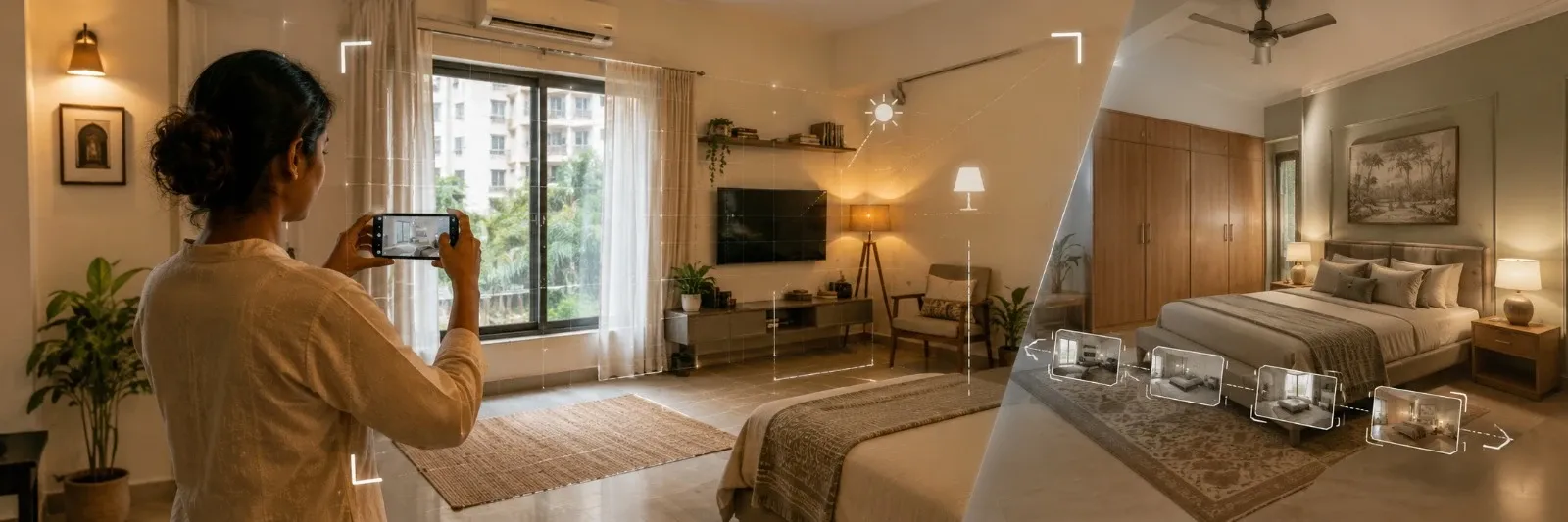
How to "Digitize" Your Room for AI Design Tools (Photography Tips)
Two people upload photos of nearly identical bedrooms to the same ai room design tool. One gets back a render that looks like their actual room, just restyled. The other gets something vaguely bedroom-shaped with a window that was never there. Same tool, same prompt style, wildly different results.
The difference almost never comes down to the prompt. It comes down to the photo. AI reads geometry, proportion, and light straight off whatever image you feed it, and most people spend twenty minutes perfecting a text description while giving the actual photo about four seconds of thought. Flip that ratio and everything downstream gets better.
Why the Photo Matters More Than the Prompt
Every ai interior design tool works the same basic way underneath. Look at the image, guess where the walls sit, figure out where the light's coming from, size up the room, then lay the requested style on top of whatever it just worked out. Give it something clear and well lit, and that guesswork starts from solid ground. Give it something dim or cropped or shot at some odd angle, and it's building on sand, furniture ends up floating oddly, proportions feel wrong, sometimes there's a window in the render that was never in your actual room.
Garbage in really does mean garbage out here. Not a saying, just accurate.
The Right Camera Angle
Stand in a corner. Not the middle of the room, an actual corner, and aim your phone toward the opposite one. This gets the maximum amount of the room into a single frame, which gives the AI the clearest possible read on how the space is actually laid out.
Hold the phone around chest height, roughly where your eyes naturally sit when standing. Shooting from the floor or from a chair distorts proportions in ways that are surprisingly hard for the AI to correct, and shooting from directly above does something similar. A natural standing eye line is what most tools were trained on, and it's what produces the least distorted read.
Getting the Lighting Right
Shoot during the day, but don't rely on daylight alone, switch your room lights on too. Both together give the AI a fuller picture of how the space actually looks day to day, rather than one lighting condition pretending to be the whole story.
Here's something that trips up a lot of Indian homes specifically. Tube lights throw a cool, slightly bluish white. LED bulbs, depending on the pack, run anywhere from warm yellow to cool white. Mixing tube lights in one room with LEDs in another, or shooting under a flickering old tube light, confuses the AI's colour reading more than you'd expect, wall colours especially can come back looking subtly wrong. If you can, shoot under whatever your dominant light source actually is and keep it consistent.
Skip flash entirely. It kills the shadow detail the AI actually relies on to read depth, and washes colour out in a way that's genuinely hard to fix afterward. A grey monsoon day isn't perfect either, that flat overcast light has its own issues, but it still beats flash by a wide margin. Curtains open, room lights on, let the two combine and work with what you've got.
Decluttering Before You Shoot
Counters, floor, wherever daily stuff tends to collect, clear it first. A charging cable left out, the laundry basket, a stack of mail sitting on the bed, none of that's permanent, but the AI has zero way of knowing which parts of the room are real and which are just Tuesday's mess. Sometimes it'll actually try weaving that clutter into the redesign like it's furniture, and the results get weird fast.
Nobody's asking for a magazine shoot here. Bed, wardrobe, sofa, whatever's actually fixed in place, leave it. It's only the loose stuff, the obviously temporary things, that need ten minutes of clearing before you pick up the phone.
One Room, Multiple Angles When It's Needed
A plain rectangular room, one decent corner shot does the job. Anything trickier though, an L-shaped living room, a tight galley kitchen, a bedroom with some awkward alcove eating into it, needs two or three shots from different spots. Cram a complicated layout into one frame and the AI just starts guessing at whatever's sitting outside that frame, and those guesses rarely match your actual room.
When you're unsure, just take the extra shot. Costs nothing, and it's the cheapest way to avoid a redesign that looks nothing like where you actually live.
What a Photo Alone Can't Show You
A support column just out of frame. A plumbing point behind a cabinet. Electrical points for a chimney or an AC unit that aren't visible in any reasonable shot. None of this shows up in a photo no matter how well you shoot it, so it needs to go into your prompt as text instead. Mention fixed structural elements explicitly rather than assuming the AI will somehow know they're there, because it won't.
Common Photography Mistakes That Ruin AI Results
|
Mistake |
What Happens |
The Fix |
|
Shooting from floor level or a low angle |
Distorted proportions, furniture looks oddly scaled |
Shoot standing, roughly chest height |
|
Using flash |
Flat lighting, lost shadow detail, washed out colour |
Use daylight plus room lights instead |
|
Cropped or tight shot |
AI guesses at what's outside the frame |
Stand in a corner, capture the full room |
|
Cluttered counters or floor |
AI may incorporate temporary items into the design |
Clear loose items before shooting |
|
Mixed or inconsistent lighting |
Colour reading comes back inaccurate |
Shoot under one consistent light source |
|
Single photo for a complex layout |
Awkward corners or alcoves get invented incorrectly |
Take two or three angles for irregular rooms |
A Quick Pre-Shoot Checklist
Clutter goes first, the loose stuff anyway. Lights on, yes even at noon. Curtains pulled back too, one without the other isn't enough. Corner of the room, phone at chest height, get as much in frame as you physically can. Second angle if there's an alcove or an odd corner anywhere. And no flash, not even once.
Wrap-Up
Everyone obsesses over the prompt. Meanwhile the photo's quietly doing most of the heavy lifting. Corner shot, standing height, daylight and room lights running together, counter cleared off, a second angle thrown in if the room's got any awkward bits, get that combination right and you've fixed most of what makes these redesigns look off in the first place. Sort the photo out first. The prompt will have something real to build on after that.
In Case You Missed Anything
Everything you need to know about transforming your space with AI
Photo quality wins this one most of the time, honestly. The prompt handles style, sure, but the photo is where the AI actually learns your room's shape, its light, its layout. Nail the prompt on a bad photo and you'll still end up with something mediocre.
Daytime's generally your best bet, natural light just gives the AI a cleaner overall read. Keep your room lights switched on too though, don't lean on daylight by itself, since that's not really how anyone actually experiences the room day to day.
Don't, use them together. Daylight on its own leaves parts of a room looking patchy or dim, worse in the evening or under an overcast sky, and room lights alone miss whatever natural light is doing to the space during the day.
One clear corner shot is enough for a simple rectangular room. Anything with an unusual layout, an L-shape, an alcove, a narrow galley kitchen, benefits from two or three shots taken from different corners.
You can try, sure, just hold it to the same bar. Well lit, whole room in frame, no flash, reasonably tidy. Problem is, most saved photos were taken for something else entirely, a quick send to the family group chat, not a careful room shot, and they usually miss on at least one of these. Probably worth just reshooting.
Barely matters, honestly. Any halfway modern phone is fine. What actually moves the needle is angle, light, and framing, not megapixels, a so-so phone shot properly beats a flagship camera shot carelessly, every single time.
Lean entirely on your artificial lighting then, and try to keep it one consistent source rather than a mix of bulb types fighting each other. Turn on everything, shoot. Won't match a daylight shot exactly, but an evenly lit room under artificial light still gives the AI something solid to work from.