
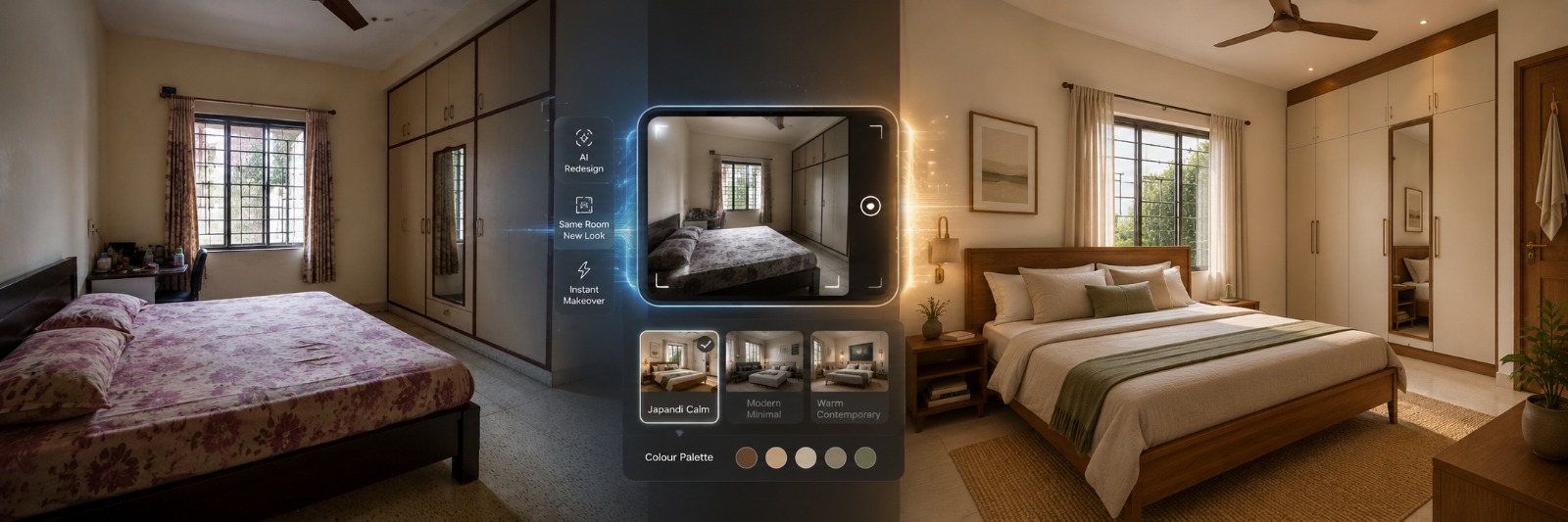
How to Design a Bedroom with AI from One Photo (2026)
One photo does it now. Upload a picture of your actual bedroom, real walls, real window, the bed frame you've had for years, and what comes back is a redesigned version of that exact room. Not a stock image wearing your style tag. Your room.
Most people go looking for this expecting a mood board generator. What they actually want, even if they haven't said it out loud, is something built from their own four walls. This is that walkthrough, including the parts, vastu, almirahs, tight room sizes, that most guides skip past entirely.
Two Tools Hiding Under One Search Term
Search "AI bedroom design" and you'll surface two genuinely different things. Mixing them up wastes an afternoon.
Type-a-description tools invent a bedroom from words alone. "Cozy bedroom" becomes some room that's never existed, wrong proportions, a window nobody has, furniture arranged in ways gravity wouldn't allow. Fun to browse. Useless for actual planning.
The other kind starts with your photo and gives back your room, restyled. Same wall angles, same window, same ceiling height. That's the one this guide is about, because it answers the only question that actually matters: will this look right in my room.
A close cousin of that second type exists too, mainly built for staging an empty room for a property listing rather than redoing a room you already live in. Different job, worth knowing it's there.
The Genuinely Useful Part
Testing a colour before you spend a rupee on it. That deep olive wall with brass fittings you keep imagining, generate it against your actual room and just see it, no more guessing in your head.
Putting a few directions side by side. Warm minimalist next to something moodier next to a more traditional teak-and-brass version, all pulled from one photo, compared properly instead of scattered across browser tabs in your memory.
Getting your painter, your carpenter, or your undecided spouse looking at the same thing you're picturing. An image of your specific room says more in five seconds than a folder of somebody else's bedrooms ever will.
And there's the paralysis problem. A plain, dated room with zero starting point is genuinely hard to think about. Three or four generated options gives you something to react to, which turns out to be a much easier way to figure out what you want than staring at a blank room hoping inspiration arrives.
Where a Single Photo Runs Out of Answers
It won't hand you real measurements. A bed might look proportionally fine in the render and still leave you eleven inches of walking space next to your almirah in actual life.
Structural changes are off the table completely. Shifting a window, adding a closet, changing a door's swing direction, none of that counts as restyling. That's construction, and it needs a contractor with an actual floor plan, not a render.
And it knows nothing about how your family actually lives in the room unless you say so directly. A study corner that has to exist. A pooja shelf that's staying put no matter what. Whether monsoon humidity rules out a particular fabric. Say it, or the tool has no way of guessing it.
Getting an Actual Result
Start with the photo. Corner of the room, phone roughly at chest height, get the whole window and the ceiling line and the door into one frame if you possibly can. Daytime, curtains pulled back, room lights on too. Half the room in a dim, cropped photo and that's exactly what you'll get back, half a room, dimly understood.
Then figure out what you're actually testing. "A nicer bedroom" tells the tool nothing useful. Something like "warm minimalist, walnut furniture, no more than two accent colours, keep the almirah exactly where it is" gives it real direction, and gives you a result you can measure against an actual question instead of a vague feeling.
Generate more than one. Three or four, ideally. Comparing options tells you far more than any single result, because it shows you which piece is actually doing the work, whether it's the wall colour or the bedding or just the lighting doing all the heavy lifting.
Once you've got results, hold them against what's real. Where your almirah genuinely sits. Whether this room doubles as a study or storage space in daily life. And, if it matters to your household, vastu preferences around where the bed sits.
One last thing, once a direction starts feeling right, stop chasing the exact image. Grab the actual decisions out of it instead, wood tone, colour family, whether the whole room leans warm or cool, that's your real shopping list. Trying to match pixels exactly was never really the goal here anyway.
Styles Worth Trying First
|
Style |
Look |
Works Best For |
|
Warm minimalist |
Teak or sheesham, one or two muted accents, linen |
Almost any room, safest starting point |
|
Japandi |
Low platform bed, natural materials, uncluttered |
Smaller rooms needing visual lightness |
|
Traditional teak and brass |
Carved headboards, brass fittings, layered |
Homes leaning classic Indian aesthetic |
|
Moody, saturated |
Deep green or charcoal, warm lamp light |
Rooms with strong natural light to absorb it |
|
Coastal neutral |
Whites, light wood, cane texture |
Bright, airy rooms, especially coastal cities |
Try two or three of these on your own photo and see what happens, you'll walk away knowing more about your room's actual light and size than any amount of scrolling could've taught you.
Vastu, and Why You Have to Say It Out Loud
Here's the thing about most AI tools, vastu simply isn't in their vocabulary. Nothing built in, nothing assumed by default. So if bed direction or mirror placement genuinely matters to your household, it has to be typed into the prompt, plainly, every single time. Which way you sleep facing. A beam that shouldn't sit directly over the bed. A mirror that needs to avoid facing the bed head-on. Get it into the prompt before generating, because correcting a finished layout after the fact usually means starting the whole thing over rather than nudging one detail.
Where People Go Wrong
A dark, tightly cropped photo gives you a worse redesign, and it costs almost nothing to shoot it properly instead. Stopping at a single generated version tells you that one idea exists, not whether it's actually the best one, or what else might've worked. Treating whatever comes out as a finished plan rather than a direction is its own mistake, since this is a tool for narrowing decisions, not a verdict handed down. And there's the light itself, an east-facing bedroom three floors up in a Mumbai high-rise behaves completely differently from a west-facing one in the exact same building. Testing against your own actual photo, not some borrowed reference image, is precisely why that difference gets caught early instead of after the paint's already dry.
In Summary
A decent photo plus a specific ask beats a whole folder of saved Pinterest pins, and the reason's simple, you're testing a style against your own room instead of somebody else's. Measurements, structural work, getting vastu genuinely right, none of that gets handled by AI, that part still falls to you or a professional to follow through on properly. Use it the way it's meant to be used though, something that narrows decisions rather than hands you a finished plan, and "I don't know what I want" can turn into something specific and shareable in under an hour.
In Case You Missed Anything
Everything you need to know about transforming your space with AI
Yes, that's genuinely the whole point of a photo-to-photo tool. One clear, well-lit shot, and it hands back your room, same walls, same window, restyled.
Pinterest's showing you somebody else's finished bedroom. This is your bedroom, your light, your actual proportions, in a style you're weighing up, which makes it a far more honest way to judge whether something will actually work where you live.
Probably not exactly as shown. Treat it as a style cue instead, this particular wood tone, that brass finish, rather than a literal catalogue. Let it steer your real shopping rather than sending you hunting for the exact pieces on screen.
You genuinely need to state it directly, since most tools won't apply it on their own. Spell out your preferred bed direction or mirror placement rather than assuming the tool already knows.
One well-shot photo covering the full room usually does it. An unusual layout or an awkward corner benefits from a second angle, but a single clear shot is the minimum worth starting from.
Mention it in the prompt, that's really all it takes, otherwise you risk it redesigning right over a wardrobe that's actually sitting there in real life. Photos alone just don't communicate that kind of thing.
For direction, colour, style, definitely, and that alone already beats trying to explain it verbally. What it won't do is stand in for real measurements or an actual material sample. Reference point, not the final brief.